Waalaxy vs Expandi: Which LinkedIn Automation Tool Actually Scales Multi-Account Outreach in 2026
Waalaxy and Expandi both automate LinkedIn outreach, but only one is built to run at scale across many sender accounts. Here is the honest comparison, the proxy question that decides it, and the account layer both tools need.
If you are choosing between Waalaxy and Expandi, you have probably read a dozen feature tables that all say roughly the same thing: both automate connection requests and messages, both build sequences, both claim to save you hours. That comparison misses the one question that actually decides which tool fits your operation. It is not the feature list. It is how each tool handles running outreach across more than one account.
This guide walks through what each tool is genuinely good at, who it fits, and the technical dividing line that matters the moment you try to scale past a single profile. If your goal is real outbound volume, that dividing line is the whole story.
The Short Version
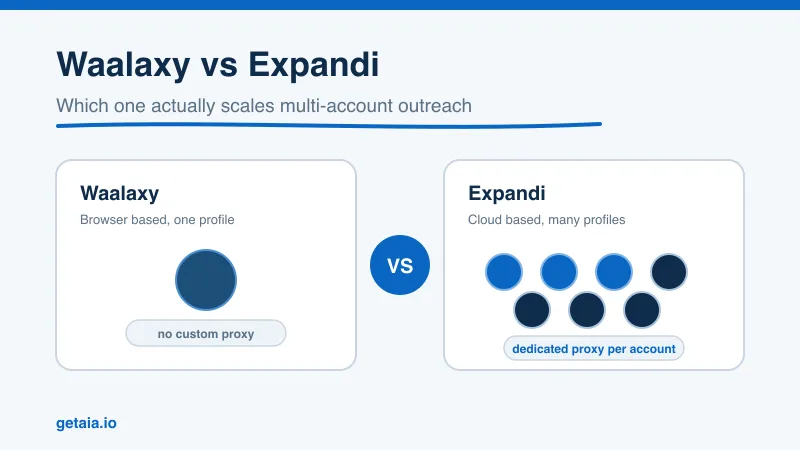
Waalaxy is a browser-based tool built for one person running outreach from one LinkedIn profile. It is approachable, freemium, and gets a solo user sending in an afternoon.
Expandi is a cloud-based tool built for teams and agencies running outreach across many accounts, with a dedicated proxy assigned to each one. It has a steeper setup but it is designed for scale.
The deciding factor is custom proxy support. Waalaxy runs through your own browser and IP, so it is tied to your single real account. Expandi supports a dedicated proxy per account, which is what lets it run many sender profiles safely at once. If you plan to scale beyond one profile, that difference decides everything, and it also determines what kind of accounts you can run.
What Waalaxy Does Well
Waalaxy is a Chrome extension that automates LinkedIn (and some email) outreach directly from your browser. Its strengths are real:
- Fast to start. Install the extension, connect your profile, and you can launch a sequence quickly.
- Freemium entry. You can test it without committing budget, which lowers the barrier for solo users and small teams.
- Clean interface. Sequence building is visual and beginner friendly.
Waalaxy fits a founder, a solo salesperson, or a single recruiter who wants to automate outreach from their own profile and does not need more than one sending identity. For that use case it is a solid pick.
The constraint shows up the moment you want more volume than one account can safely produce. Because Waalaxy runs through your browser on your own IP, it is bound to that single profile. There is no custom proxy layer, so you cannot cleanly run a fleet of separate accounts each on its own dedicated IP. When your pipeline needs thousands of touches a week, one profile cannot get you there, and Waalaxy’s architecture does not give you a safe way to add more.
What Expandi Does Well
Expandi is a cloud-based platform, which means it runs on its own servers rather than your browser. That single architectural choice unlocks the features that matter for scale:
- Dedicated proxy per account. Expandi assigns each connected profile its own country-based proxy, so every account behaves like a real person logging in from a consistent location.
- Built for many accounts. Because each profile is isolated on its own proxy, you can run a whole set of sender accounts in parallel rather than being capped at one.
- Smart limits and warm-up. Expandi ramps activity gradually and respects daily caps, which reduces the restriction risk that comes with aggressive sending.
Expandi fits agencies, sales teams, and anyone whose plan is to scale outbound across multiple sender profiles. The tradeoff is a steeper learning curve and a higher price point than a freemium extension, according to Expandi’s own positioning as a cloud tool. If you are running one profile and never plan to add more, that overhead may be more than you need. If scale is the goal, it is the point.
The Real Dividing Line: Custom Proxies and Multiple Accounts
Here is the part most comparisons skip. LinkedIn caps how much a single account can safely do. A healthy profile can send roughly 100 to 200 connection requests a week plus a limited number of messages before the platform starts to throttle or restrict it. There is no tool that lifts that ceiling on a single account, because the ceiling is enforced by LinkedIn, not by the software.
The only way to genuinely scale is to run more sending accounts. And the moment you run more than one account, each one needs its own dedicated IP address. If several profiles all log in from the same IP, LinkedIn reads that as a network of linked accounts and starts restricting them together. A dedicated proxy per account is what keeps each profile looking like an independent, real person.
This is exactly why custom proxy support is the feature that matters, and it is where the two tools split:
- Expandi supports custom proxies. It assigns a dedicated proxy to each account, so you can run many profiles safely. It sits in the same category as other scale-ready tools like HeyReach, Skylead, We-Connect, Buzz, and LIA.
- Waalaxy does not. It runs on your browser and your IP, tied to your one account. Several other popular tools share this limitation, including Dripify, Zopto, Dux-Soup, and Ulinc. They are fine for a single personal profile, but they cannot cleanly run a fleet of rented or additional accounts on separate proxies.
If your entire plan is to automate one profile, either category works and Waalaxy is the simpler choice. If your plan is to scale, you need a proxy-supporting tool like Expandi, and you need something Expandi itself does not provide: the accounts to run.
The Account Layer Both Tools Need
Here is what neither Waalaxy nor Expandi actually gives you: the sending accounts. An automation tool is the engine. It sequences, personalizes, and sends. It does not hand you a fleet of warmed, ready-to-send LinkedIn profiles. Once you commit to scaling, sourcing that account layer becomes the real bottleneck, and it is a bigger problem than picking a tool.
Creating and warming a batch of new LinkedIn profiles by hand is slow, and fresh accounts get restricted fastest because they have no history and no connections. Buying accounts outright means inheriting unknown baggage with no support path when they die. This is the gap that AIA avatars are built to fill: AI-driven LinkedIn profiles that arrive pre-warmed and pre-aged, each with 100 or more connections and a 48-hour replacement SLA if an account is ever restricted.
That combination is what makes a tool like Expandi actually scalable. Expandi supplies the sequencing and the proxy management. AIA supplies the sender identities that plug into it. You can see how the account layer connects to your existing stack on the AIA integrations page, which covers the proxy-supporting tools AIA avatars are designed to run with.
What the Account Layer Costs
The reason operators rent the account layer instead of buying or building it is the economics. AIA tiers are monthly and transparent rather than a one-time gamble:
- Gold at $147 per profile per month, ID verified
- Titanium at $197 per profile per month, ID verified
- Silver at $97 per profile per month
- Platinum at $177 per profile per month
Volume discounts of 10, 20, and 30 percent kick in at 10, 50, and 100 or more avatars, so the account layer gets cheaper per profile as you scale rather than more expensive. The full breakdown lives on the AIA pricing page.
The 48-hour replacement SLA is the part that changes the math. In a buy-or-build model, a restriction is a dead loss you have to replace yourself. In a managed model, a restriction is a normal operating event: the account gets replaced inside 48 hours and your Expandi sequences keep running. You are not betting your pipeline on any single profile staying alive.
Why ID Verification Matters When You Scale
Cold outreach from an unverified profile gets less trust than outreach from a verified one. The ID-verified tiers, Gold and Titanium, carry a genuine verification badge, which increases credibility on cold connection requests and measurably lifts reply rates. Because the account is managed rather than resold credentials, the verification is part of the infrastructure you rent, and if a profile is ever replaced, the replacement comes verified too. For high-value outreach, that trust signal is worth the tier difference.
A Real Result at Scale
The point of scaling is not more accounts for their own sake, it is pipeline. A top-100 US agency ran 185 AIA avatars and generated 500 or more SQLs and $2.3M in net-new revenue in under 90 days. That result came from pairing the right automation tool with the right account infrastructure. The tool handled the sequencing. The account layer is what made the volume sustainable.
An Honest Note on Platform Risk
Running LinkedIn outreach at scale carries real platform risk. LinkedIn actively works to detect automation and restrict accounts that push past its limits. Dedicated proxies, gradual warm-up, careful daily caps, and ID verification all reduce that risk, but none of them eliminate it. Any tool or provider that promises zero risk is not being straight with you.
That is why the 48-hour replacement SLA matters more than any safety claim. You are not trying to make individual accounts immortal. You are running a fleet where the occasional restriction is a normal operating expense that gets replaced fast, not a crisis that stops your pipeline.
How to Choose
Choose Waalaxy if you are one person automating one profile and you value a fast, freemium, browser-based start. It does that job well.
Choose Expandi if your plan is to scale outbound across multiple sender accounts with a dedicated proxy on each. It is built for exactly that, and it belongs in the proxy-supporting category alongside HeyReach and Skylead.
Then, whichever proxy-supporting tool you pick, source the account layer it needs. The fastest path to scale is:
- Pick a proxy-supporting automation tool (Expandi if you want per-account personalization, HeyReach if you want volume rotation across many senders).
- Source pre-warmed accounts from a provider with a replacement SLA, rather than building or buying them yourself.
- Start conservatively at 15 to 20 requests per day per account for the first two weeks, then ramp.
The AIA pricing page has the full tier breakdown and volume discount calculator. If you want to talk through the right setup before committing, reach out on WhatsApp at wa.me/37256084933.
Ready to build your sender fleet? Visit app.getaia.io to get started, or explore why AIA avatars are the account layer serious outreach teams run underneath tools like Expandi.



