How to Warm Up a New LinkedIn Account for Outreach
A new LinkedIn account can get restricted fast if you scale outreach too soon. Here is a practical, week by week warm-up plan to build trust, avoid limits, and reach safe sending volume.
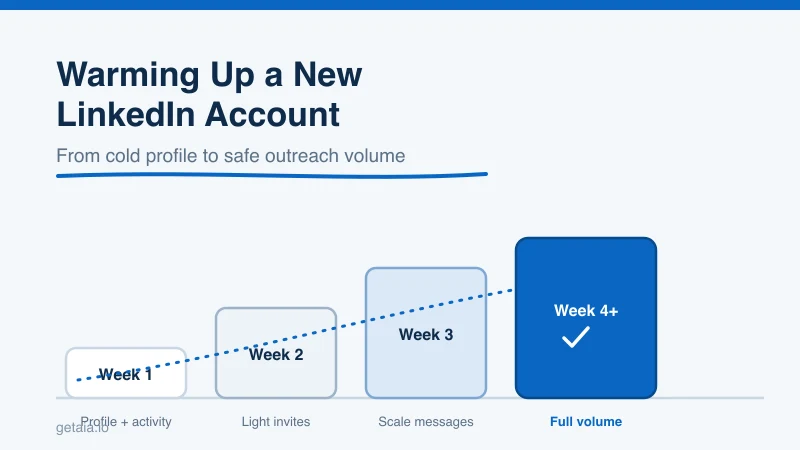
Spinning up a brand new LinkedIn account and immediately blasting 100 connection requests a day is the fastest way to get it restricted. LinkedIn watches new profiles closely, and a cold account with no history that suddenly behaves like a seasoned outreach machine looks exactly like the automation it is trying to block. The fix is not to send less forever. It is to warm the account up first, so by the time you are running real outreach the profile already looks lived-in and trustworthy.
This guide walks through a practical, week by week warm-up plan: what to do before you send a single invite, how to ramp volume without tripping limits, and the signals LinkedIn actually rewards. It applies whether you are warming a personal profile, a new sales seat, or a fleet of accounts for scaled outreach.
Why New Accounts Get Restricted
LinkedIn’s trust system is built around behavior over time. Established profiles with a complete history, real engagement, and a normal activity curve get a lot of leeway. New accounts get almost none. A profile that is days old has no track record, so every action carries more weight and less tolerance.
The most common ways people burn a new account in week one:
- Sending too many connection requests too fast. A cold account sending 50 to 100 invites a day is the number one trigger for a warning or a temporary restriction.
- A skeletal profile. No photo, no headline, no experience, no connections. This reads as fake, and fake profiles get flagged.
- Withdrawing and re-sending invites. High withdraw rates and pending-request pileups look manipulative.
- Running automation immediately. Perfectly timed, round-the-clock activity from a day-old account is an obvious pattern.
Warm-up solves all of these by giving the account a normal-looking history before you ask it to do any heavy lifting.
Step 1: Build the Profile Before You Send Anything
Before outreach even enters the picture, the profile has to look like a real person who belongs on the platform. This is the single highest-leverage thing you can do, because a complete profile lowers your restriction risk on every future action.
Get these in place first:
- A clear, human profile photo and a banner image. If you need help here, see how to get a good LinkedIn photo.
- A specific headline and a filled-out About section. Our guide on what to put in the About section on LinkedIn covers this.
- At least a couple of experience entries, education, and a handful of skills.
- A custom profile URL so the account looks intentional. Here is how to change your LinkedIn profile link.
A profile that is even 80% complete before you send your first invite behaves very differently in LinkedIn’s eyes than a blank one.
Step 2: Act Like a Human for the First Week
The goal of week one is simple: use LinkedIn the way a normal new user would, and send zero cold outreach. You are teaching the platform that this is a real person with real behavior.
During the first 5 to 7 days:
- Log in from a consistent device and location. Do not hop across IP addresses.
- Spend 10 to 15 minutes a day browsing your feed, viewing profiles, and reading posts.
- Like and comment on a few posts. Genuine engagement is one of the strongest positive trust signals.
- Follow a few companies and a couple of well-known people in your space.
- Accept any incoming connection requests, and send a small number of invites only to people you actually know.
No tools, no automation, no bulk anything this week. You are just establishing a baseline of normal human activity.
Step 3: Ramp Connection Requests Slowly
Once the profile has a week of natural activity, you can start adding connections deliberately. The mistake is jumping straight to your target volume. Instead, climb toward it.
A safe ramp for a fresh account looks roughly like this:
- Week 2: around 5 to 10 connection requests per day, spread across the day rather than all at once.
- Week 3: 10 to 20 per day if acceptance rates are healthy and you have had no warnings.
- Week 4 and beyond: work up toward the normal ceiling of roughly 100 to 150 quality invites per week, watching your acceptance rate the whole way.
Two rules matter more than the exact numbers. First, personalize early invites so acceptance stays high. A pending pile of ignored requests hurts you. If you want to reclaim capacity, learn how to cancel connection requests on LinkedIn rather than letting them rot. Second, keep your acceptance rate up. LinkedIn treats a high acceptance rate as a sign that people want to hear from you, and it treats a low one as spam.
Step 4: Add Messaging and Content Once Connections Are Flowing
Outreach is not just invites. As connections start accepting, layer in the rest of a normal presence so the account is not a one-dimensional request machine.
- Send thoughtful follow-up messages to new connections instead of an instant pitch. Timing helps here; see the best time to send LinkedIn messages.
- Post occasionally. Even one or two simple posts a week signals an active, real account. Our take on how to make a post on LinkedIn is a good starting point.
- Keep engaging with other people’s content. Do not let the account become send-only.
By the end of a few weeks, the account has a photo, a complete profile, weeks of engagement history, a growing network, and a normal messaging pattern. That is a profile LinkedIn trusts, and trust is what lets you run outreach at volume without constant restrictions.
Step 5: Only Introduce Automation After the Account Is Warm
Automation is not the enemy. Automation on a cold account is. Once a profile has been warmed for three to four weeks and is behaving normally at moderate volume, you can introduce tooling carefully, staying inside human-like limits and randomizing timing. For the guardrails, read LinkedIn automation: benefits, best practices, and limitations and our guide to protecting your LinkedIn account from restriction or suspension.
The pattern is always the same: warm first, automate second, scale third. Reverse that order and you spend more time recovering restricted accounts than you save.
The Shortcut: Start With Pre-Warmed Accounts
Warming an account properly takes three to four weeks per profile. That is fine for one seat. It becomes a serious bottleneck when you need ten or twenty identities to hit real outreach volume, because every new account restarts the clock and any misstep during warm-up can cost you the profile.
This is exactly the problem AIA avatars solve. Instead of building and babysitting new profiles through a fragile warm-up, you rent purpose-built accounts that come pre-warmed and ID-verified, ready for outreach from day one. If you are weighing that against building your own, the comparison in AIA avatars or aged LinkedIn accounts: which is better breaks down the trade-offs, and renting LinkedIn accounts for outreach covers the economics.
Bottom Line
A new LinkedIn account is fragile, and the temptation to scale it immediately is what gets it restricted. Complete the profile first, spend a week acting like a real human, ramp connection requests slowly, layer in messaging and content, and only automate once the account is genuinely warm. Do that, and you reach safe outreach volume with an account that lasts. Skip it, and you will be starting over. And when you need that warm-up to already be done across many accounts, AIA gives you profiles that are ready to run on day one.



