Renting LinkedIn Accounts for Outreach: A Practical Buyer's Guide
Thinking about renting LinkedIn accounts to scale outreach? Here is how rented, aged, and ID verified accounts really compare on price, risk, and scalability, and where AIA avatars fit in.
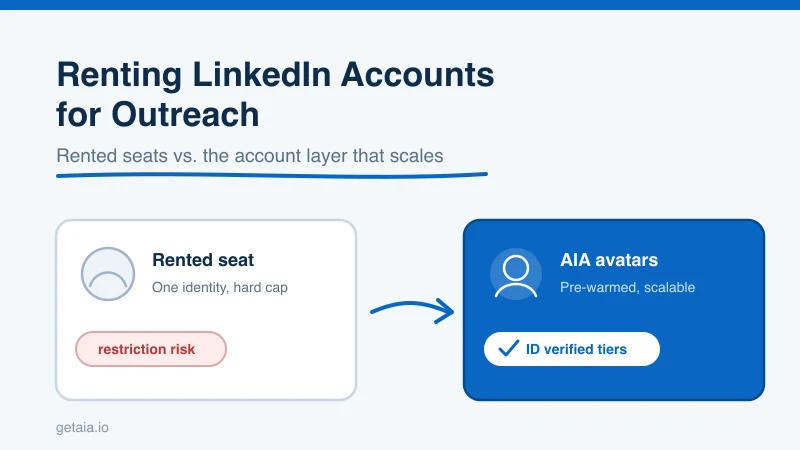
If you run outbound on LinkedIn, you hit the same wall everyone hits. One profile can only send so many connection requests and messages per week before LinkedIn slows you down or restricts the account. So you start looking for more accounts to run, and that search almost always lands on the same question: should you rent LinkedIn accounts, buy aged ones, or build an account layer you actually control?
This guide walks through the real options for renting LinkedIn accounts for outreach, what each one costs, where the risk sits, and how to scale without putting your primary profile in the line of fire. We will keep it practical and honest, including the parts most vendors skip.
Why People Rent LinkedIn Accounts in the First Place
The math is simple. LinkedIn caps activity per account. A safe weekly ceiling for most profiles is roughly 100 to 200 connection requests plus a limited number of InMails and messages. If your pipeline needs 2,000 touches a week, one account cannot get you there. You need volume, and volume means more identities sending outreach.
There are three common ways teams add that capacity:
- Rent or buy aged LinkedIn accounts. You pay for existing profiles that already have history and connections.
- Recruit real people. You pay contractors or employees to run outreach from their own profiles.
- Use AI avatar accounts. You rent purpose built profiles that come pre warmed and are designed for outreach at scale.
Each path solves the volume problem. They differ a lot on price, control, and how likely you are to lose the account when LinkedIn tightens the screws. If you want the deeper avatar versus aged account breakdown, we cover it in AIA Avatars or Aged LinkedIn Accounts: Which is Better.
What “Renting a LinkedIn Account” Actually Means
Renting usually means one of two things.
Renting an aged profile. A vendor hands you login access to a profile that has existed for months or years and carries a connection base. You run outreach from it, and the vendor keeps ownership. Prices in this market sit in a familiar band. MirrorProfiles lists rented profiles around $150 in the US. LinkedRent runs roughly $140 to $190 per profile. Linkunity sits around $110 to $135. GoAccounts ranges from about $149 to $249 depending on the tier, and Sbl.so starts near $35 for lower spec accounts. Those figures come from each provider’s own pages, so treat them as anchors and confirm current pricing before you buy.
Renting an avatar profile. Instead of an inherited human account, you rent a purpose built identity created and warmed for outreach. This is the model AIA uses. Every avatar arrives pre warmed and pre aged with 100 or more connections already in place, so you are not starting from a cold zero history profile that LinkedIn watches closely.
The difference matters more than the label. With an inherited aged account, you are borrowing someone else’s history and hoping LinkedIn never asks that account to verify who it is. With an avatar built for outreach, the identity is designed for the job from day one.
The Honest Part: LinkedIn Outreach Carries Risk
Any vendor who tells you rented accounts are one hundred percent safe is selling you a story. LinkedIn actively works to detect and restrict automated or high volume outreach. That is true for a rented aged account, a bought account, and an avatar account. Aggressive sending, sloppy targeting, or a login pattern that looks off can all trigger a restriction.
So the right question is not “is this risk free.” It is “when an account gets restricted, what happens to my pipeline, and how fast do I recover.” That is where the model you choose makes the real difference:
- If you buy an aged account outright and it gets restricted, you eat the loss and start over.
- If you rent an inherited profile, replacement depends entirely on the vendor’s policy, and many are vague about it.
- With AIA avatars, a restricted profile is covered by a 48 hour replacement SLA. Your capacity comes back fast, so a single restriction does not stall the campaign.
Honesty about risk is the whole point. You manage it with fast replacement, sane sending limits, and identities that can prove they are legitimate. That last piece brings us to the argument you have probably seen from competitors.
Rebutting the “Only Real ID Verified Accounts Work” Pitch
Some rented account vendors, Linkunity among them, push a narrative that real ID verified accounts always beat “synthetic avatars,” and they aim that argument straight at AIA. It is a clever pitch. It also sets up a false choice, because it assumes avatars cannot be ID verified. They can.
AIA offers ID verified tiers directly. Gold and Titanium avatars are ID verified, so you get the trust signal LinkedIn’s verification badge provides without renting a borrowed human profile you do not control. You can read exactly how that works on the ID Verified LinkedIn Accounts page and see why the avatar model holds up on the Why AIA Avatars page.
So the real comparison is not “synthetic versus verified.” It is “a borrowed profile you rent and cannot fully control” versus “a verified identity built for outreach that you can scale, replace in 48 hours, and run across multiple channels.” When you frame it that way, the ID verification argument stops being a reason to avoid avatars and becomes a reason to pick the verified avatar tier.
Renting Options Compared
| Option | Typical price per profile / month | Who controls it | Restriction recovery |
|---|---|---|---|
| Aged / rented human profiles (MirrorProfiles, LinkedRent, Linkunity, GoAccounts, Sbl.so) | About $35 to $249 depending on spec | Vendor keeps ownership | Varies by vendor, often unclear |
| AIA Gold (ID verified) | $147 | You rent, purpose built | 48 hour replacement SLA |
| AIA Titanium (ID verified) | $197 | You rent, purpose built | 48 hour replacement SLA |
| AIA Silver | $97 | You rent, purpose built | 48 hour replacement SLA |
| AIA Platinum | $177 | You rent, purpose built | 48 hour replacement SLA |
A few things to note. AIA pricing is flat and public, so you can budget without haggling. You can see the full breakdown on the AIA pricing page. Running email alongside LinkedIn? Pre warmed email avatars are $11 per domain. And because outreach almost never stays on one channel, avatars are built to run LinkedIn, email, and more from a single coordinated identity.
The Cost Curve When You Actually Scale
The per profile sticker price is only half the story. The bigger lever is what happens when you go from a handful of accounts to dozens.
With rented human profiles, scaling means sourcing more inventory, and price and quality wobble as you add profiles. With AIA, volume discounts are built in: 10 percent off at 10 or more avatars, 20 percent off at 50 or more, and 30 percent off at 100 or more. That curve is what makes running a large avatar fleet realistic instead of theoretical.
Here is the proof point. One top 100 US agency, an AIA client, ran 185 avatars and generated more than 500 sales qualified leads and $2.3 million in net new revenue in under 90 days. You do not get to 185 human rented accounts cleanly, and you certainly do not manage them as one coordinated outreach layer. That is the practical case for renting an avatar fleet over stitching together borrowed profiles.
How to Rent LinkedIn Accounts Without Getting Burned
Whatever route you pick, protect yourself with a short checklist:
- Never run outreach from your personal or primary company profile. Keep a firewall between your brand identity and your outbound volume.
- Confirm the replacement policy in writing. A vague answer is a red flag. A clear SLA, like AIA’s 48 hour replacement, is what you want.
- Respect sending limits. Ramp gradually and keep per account volume in a sane range so you look human, not like a bot farm.
- Prefer ID verified identities for higher trust campaigns. Verification is a real signal, and you can get it on Gold and Titanium avatars.
- Plan for multiple channels. LinkedIn alone is fragile. Pairing it with email spreads risk and lifts reply rates.
If you want the integration and workflow side, the AIA integrations page shows how avatars slot into the outreach tools you already run, and How to Start AIA walks through setup step by step.
So, Should You Rent LinkedIn Accounts?
If your goal is to scale outreach past what one profile allows, renting accounts is the right instinct. The nuance is in what you rent. Borrowed aged profiles can work, but you inherit someone else’s history, you depend on unclear replacement terms, and you are limited to LinkedIn. Renting purpose built avatars gives you pre warmed identities, optional ID verification through Gold and Titanium tiers, a 48 hour replacement SLA, volume discounts as you grow, and multi channel reach from one coordinated layer.
Outreach on LinkedIn will always carry some platform risk. You do not beat that risk by pretending it is gone. You beat it by choosing an account layer that recovers fast, verifies when it needs to, and scales with your pipeline instead of against it.
Ready to Scale Your LinkedIn Outreach
Skip the guesswork of renting borrowed profiles. Rent pre warmed, ID verifiable AIA avatars built for outreach at scale, backed by a 48 hour replacement SLA and volume discounts as you grow. Start your order at app.getaia.io and put a real account layer behind your pipeline.



