Linkunity vs AIA: Which LinkedIn Account Provider Actually Scales Your Outreach?
Linkunity claims real ID-verified human accounts beat synthetic avatars. Here is the honest comparison of Linkunity vs AIA on pricing, scale, multi-channel support, and what actually matters when you are running serious outreach volume.
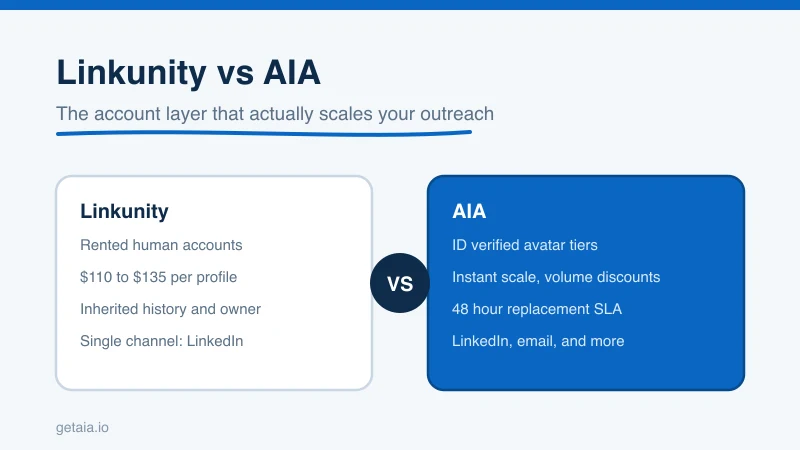
Linkunity runs a “LinkUnity vs GetAIA” page that pushes a clear narrative: real ID-verified human accounts beat AI-generated avatar profiles for LinkedIn outreach. It is a reasonable point to raise, and it deserves an honest answer rather than being left unanswered.
This post walks through that comparison directly. We will cover pricing, account quality, scale, replacement policy, multi-channel reach, and the one factor that determines whether a LinkedIn account provider actually helps your team hit quota at volume.
The Core Claim Worth Addressing
Linkunity’s argument is that a rented human LinkedIn profile is safer than a purpose-built avatar because it has a real person behind it, a real history, and real connections built over time. That sounds compelling until you ask a few follow-up questions:
- How many of those connections are relevant to your ICP?
- What happens when the account owner reclaims access or LinkedIn detects the handoff?
- Can you scale to 50 or 100 profiles without the individual account histories becoming a liability?
- If you want to reach the same prospects via email, can the account provider support that too?
The “real human” framing trades on a sense of authenticity that matters less than people think. What LinkedIn actually measures is behavioral consistency: does this profile behave like an active professional? Regular posting cadence, connection growth over time, realistic send volume, and a proxy that matches the account’s geography matter far more than whether a real person originally set it up.
Pricing: What You Actually Pay
Linkunity prices run roughly $110 to $135 per profile per month, based on what they publish on their own site.
AIA’s tiers run, per profile per month:
- Gold $147 (ID verified)
- Titanium $197 (ID verified)
- Silver $97
- Platinum $177
At first glance Linkunity looks cheaper at the entry tier. But AIA’s volume discounts change the math fast: 10 percent off at 10 or more avatars, 20 percent at 50 or more, 30 percent at 100 or more. If you are running a real outreach program, you are not running one or two profiles. You are running ten, twenty, fifty. That is where Linkunity’s per-unit pricing stops looking competitive.
See the full breakdown on the AIA pricing page.
Account Quality: What “Pre-Warmed” Actually Means
This is where the comparison gets technical. A fresh LinkedIn profile with zero connections and zero history will hit restrictions fast regardless of whether it belongs to a real human or an avatar. LinkedIn’s trust model is not based on identity. It is based on signal.
AIA avatars arrive with 100 or more real connections already in place, a posting history, and a profile that reads as active. The platform sees an account that has been behaving like a professional for months, not a new registration that suddenly started sending 50 connection requests per day. That pre-warmed state is what lets you start real outreach volume immediately instead of spending six to eight weeks babysitting a new profile up to operating speed.
Linkunity accounts come with history too, but it is the history of a different person. That means every connection in the network is tied to someone else’s ICP, not yours. The overlap with your target audience is incidental. An AIA avatar built for your use case starts with connections seeded toward the verticals you care about. See why AIA avatars for how that process works.
The ID Verification Question
Linkunity emphasizes that their accounts are real people and therefore real ID-verified. AIA offers ID verification as a dedicated tier: Gold at $147 per month and Titanium at $197 per month. These are not synthetic profiles pretending to be verified. They are ID verified LinkedIn accounts that carry the same verification badge LinkedIn grants to users who complete the process.
The difference is that AIA gives you the choice. If your use case demands that every profile carry a verification badge, you pick Gold or Titanium. If your volume and economics make the Silver or Platinum tier the right fit, you have that option without paying the ID-verified premium across your entire fleet.
Scale: Where the Real Difference Lives
This is the comparison that matters most for teams running serious outreach. Linkunity can supply individual accounts. AIA is built for fleet-scale deployment.
One top-100 US agency ran 185 AIA avatars as a coordinated outbound layer and drove over 500 qualified sales conversations and $2.3M in net-new revenue in under 90 days. That result is not achievable with a handful of rented human accounts. It requires a provider that can spin up dozens of operational profiles quickly, guarantee replacement when one hits a restriction, and keep the whole fleet running without manual intervention per account.
AIA’s 48-hour replacement SLA is the operational detail that makes fleet-scale outreach viable. When an account gets restricted, you are not waiting a week or negotiating a refund. You have a replacement identity running within two business days. Linkunity does not publish a comparable SLA, which means every restriction event is a negotiation with unknown resolution time.
Multi-Channel: LinkedIn Is Not Enough
The most significant gap in the Linkunity model is that it stops at LinkedIn. Modern outbound sequences that convert best run the same identity across LinkedIn connection request, LinkedIn message, email, and sometimes a follow-up touch on another channel. Reaching a prospect from one coordinated identity across multiple surfaces is materially better than reaching them from different tools that look unrelated.
AIA pre-warmed email avatars run at $11 per domain, already warmed, ready to pair with the LinkedIn avatar from the same campaign. That means your LinkedIn connection request and your email introduction come from the same named person, same company, same context. The prospect sees consistency instead of noise. Learn more about how that multi-channel identity layer fits together at AIA integrations.
Honest Risk Assessment
Both providers operate in a space where LinkedIn platform risk is real. Any tool or account that runs automated sequences faces the possibility of restriction. You should not work with any provider that tells you their approach has zero risk because that is simply not true.
What a responsible provider does is minimize that risk through proper warm-up, realistic daily limits, and a fast replacement path when something goes wrong. AIA’s 48-hour SLA and its pre-warmed account model are the practical answer to platform risk: not a claim that restrictions never happen, but a guarantee that your program does not stop when they do.
Which Provider Is Right for You
Linkunity makes sense if you need one or two profiles, prefer the idea of a rented human account, and are running low-volume outreach where scale and SLA guarantees are not priorities.
AIA makes sense if:
- You are running ten or more outreach identities
- You need volume discounts that make fleet-scale economics work
- You want ID-verified tiers without paying a premium on every profile
- You need email avatars that pair with LinkedIn identities in the same campaign
- You need a 48-hour replacement SLA so a restriction does not kill your program
If you are serious about LinkedIn outreach at scale, the account layer is the highest-leverage decision you make. Every automation tool in the market, from Expandi to HeyReach to Skylead to We-Connect to Buzz to LIA, runs on top of the accounts you feed it. A weak account layer limits every tool you plug into it. A strong one multiplies the results of every sequence you run.
You can see how to start with AIA or review the tier options at getaia.io to find the right fit for your program volume.
If you want to talk through what setup makes sense for your team, reach out on WhatsApp at wa.me/37256084933.



