The Real Cost of LinkedIn Outreach at Scale: A Cost Per Meeting Breakdown
What does LinkedIn outreach actually cost once you run it as a real channel? Here is the full stack cost, the math behind cost per meeting, and where teams quietly overspend when they scale sender accounts.
Most teams budget for LinkedIn outreach the wrong way. They price the automation tool, maybe a Sales Navigator seat, and call it a plan. Then volume climbs, accounts start getting restricted, and the real cost shows up in the gap between what they paid and how many meetings actually landed.
The number that matters is not monthly tool spend. It is cost per meeting. Here is how that math works once you run outreach as an actual channel, and where the hidden costs live.
The Four Cost Layers
Every LinkedIn outreach operation running at real volume pays for four things, whether the budget names them or not.
1. The automation layer. The tool that sequences connection requests and messages. Per seat or per account, this is the line item teams see first and usually the smallest one.
2. The account layer. The LinkedIn profiles themselves. A single account caps you at roughly 20 to 30 connection requests per day, so hitting real volume means running many senders. This is the layer most budgets underestimate, because a restricted account is not a one-time cost. It is a recurring one.
3. The infrastructure layer. A dedicated proxy per account, tied to the profile’s home country, plus the operational time to keep the fleet healthy. Skip this and restriction rates climb, which quietly raises the cost of every other layer.
4. The human layer. The person managing sequences, replying to interested prospects, and booking the meetings. This is often the largest cost and the one that scales worst if the account layer is unstable.
Where Cost Per Meeting Actually Comes From
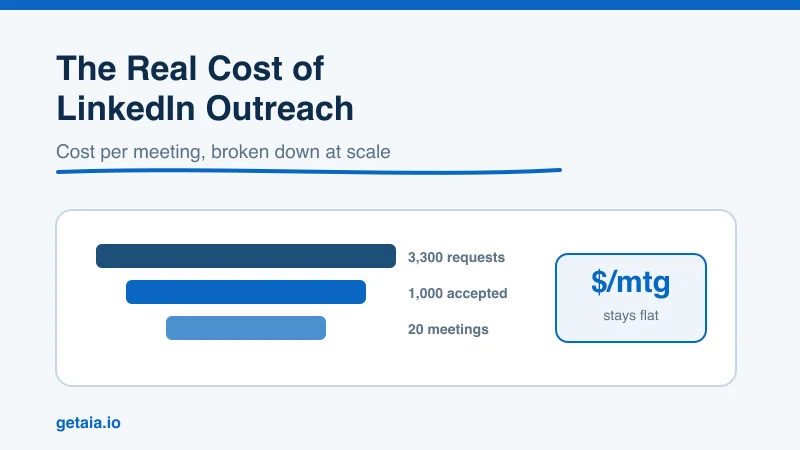
Say a team wants 20 booked meetings a month. Work backward through a realistic funnel.
At a healthy 2 percent connection to meeting rate on well-targeted outreach, 20 meetings needs roughly 1,000 accepted connections feeding the top of the funnel. At a 30 percent acceptance rate, that is about 3,300 connection requests sent. At 20 to 25 requests per account per day, that is a fleet of roughly 6 to 8 active sender accounts running the full month.
Now the cost per meeting depends almost entirely on one variable: how many of those accounts survive the month. If two of your eight accounts get restricted in week two and you cannot replace them fast, your sent volume drops, your funnel starves, and the meetings you paid to book never happen. Your cost per meeting does not just rise. It spikes, because the fixed costs stayed while the output fell.
This is why account stability is the real lever on outreach economics. ID-verified LinkedIn accounts survive longer under load because they clear the trust checks that restrict fresh or scraped profiles, which keeps your effective sending capacity close to your planned capacity.
The Replacement SLA Is a Cost Control, Not a Feature
The single biggest driver of unpredictable cost per meeting is restriction downtime. An account that goes dark for a week is a week of funnel you paid to fill and did not.
A fast replacement turns restrictions from a crisis into a planned operating expense. When a restricted account is swapped inside 48 hours, your fleet capacity barely dips and your cost per meeting stays flat. That is the entire argument for treating the account layer as managed infrastructure rather than a thing you scramble to rebuild each time LinkedIn tightens the screws. You can see how the account layer connects to your existing tools on the AIA integrations page.
Where Teams Quietly Overspend
Three patterns show up again and again in outreach budgets that look fine on paper but bleed money in practice.
- Buying cheap accounts to save on the account layer. Low-cost profiles get restricted faster, so you pay less per account and far more per meeting once downtime is priced in.
- Skipping dedicated proxies. Shared or mismatched IPs raise restriction rates across the whole fleet, which is the most expensive kind of failure because it hits every account at once.
- Under-resourcing the human layer. Interested replies that sit unanswered for two days convert far worse. The cheapest meeting is the one you already earned by getting a reply, so protecting reply speed protects your best cost per meeting.
Running the Math for Your Team
The honest way to budget LinkedIn outreach is to start from your meeting target, work back to required sent volume, then price a fleet stable enough to sustain that volume for a full month without capacity leaking to restrictions.
The AIA pricing page has the full tier breakdown and a volume calculator so you can size the account layer against a real meeting target instead of guessing. If you want to work through the numbers for your specific funnel before committing, reach out on WhatsApp at wa.me/37256084933.
Ready to price your outreach the right way? Visit app.getaia.io to get started, or explore why AIA avatars are the account layer that keeps cost per meeting predictable at scale.



