Do You Need Sales Navigator to Scale LinkedIn Outreach Across Multiple Accounts? (2026)
Sales Navigator is not required to run outreach, but it changes what each account can do. Here is when it is worth a seat, when free search is enough, and how to structure a fleet so you only pay for the seats you actually need.
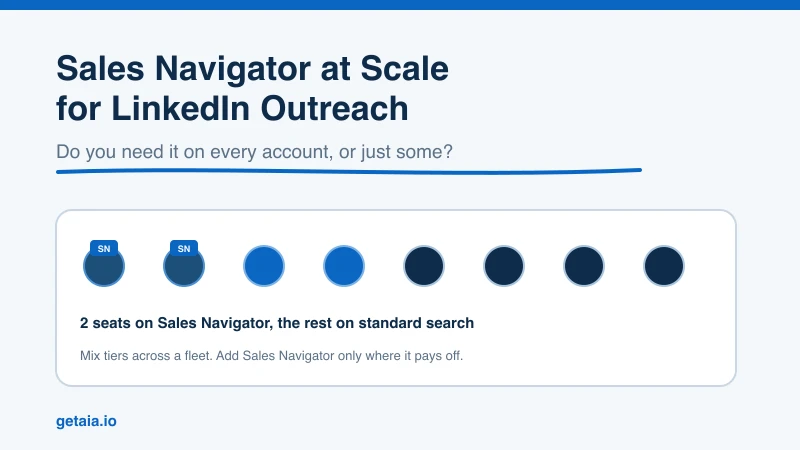
Almost every team scaling LinkedIn outreach hits the same question early: do we need Sales Navigator on every account, or can we run outreach on the free tier? It is not a trivial question when you are running 10, 50, or 100 sender accounts. Sales Navigator at $99 per seat per month adds up fast, and paying for it on accounts that do not need it is one of the most common ways teams waste budget at scale.
The honest answer is that you do not need Sales Navigator to send outreach. You need it for a specific set of jobs. Here is what those jobs are, when a standard account is enough, and how to structure a fleet so you only pay for the premium where it actually returns.
What Sales Navigator Actually Changes
A free LinkedIn account can send connection requests and messages. That is the core of outreach, and it works. What Sales Navigator adds is not the ability to send. It is the ability to find and target at scale.
The features that matter for outreach are:
Advanced search filters. Free LinkedIn search is deliberately limited. You get basic filters and a capped number of results before you hit a wall. Sales Navigator opens up filtering by seniority, function, company headcount, geography, recent job changes, and dozens of other attributes. If your targeting is precise, this is the difference between a clean list and hours of manual sorting.
Lead and account lists. Sales Navigator lets you save leads and accounts into organized lists, track them, and get alerts when something changes. For a team building repeatable prospecting motions, this structure matters.
InMail credits. Each Sales Navigator seat comes with InMail credits that let you message people you are not connected to. For some outreach plays this is central. For connection-request-first sequences, it is optional.
Higher search and viewing ceilings. Free accounts get throttled on search volume and profile views. Sales Navigator raises those ceilings, which matters when an account is doing prospecting work every day.
Notice what is not on that list: sending connection requests and messages. Those are free-tier functions. So the real question is whether the account in question is doing the finding and targeting, or just the sending.
The Two Jobs Inside Every Outreach Operation
Once you are running more than a couple of accounts, outreach naturally splits into two jobs, and they do not both need Sales Navigator.
Job one is sourcing. Somebody has to build the target lists. This is where advanced search, lead lists, and job-change alerts earn their keep. You want Sales Navigator here.
Job two is sending. Once a list exists, the sending accounts work through it: connection requests, follow-ups, replies. A sending account does not need advanced search. It needs to be warm, healthy, and running through a reliable automation tool. Sales Navigator on a pure sending account is mostly wasted spend.
This split is the single most useful idea for controlling cost. Most teams do not need Sales Navigator on every seat. They need it on the profiles doing sourcing, and standard accounts everywhere else. In practice that means a couple of Sales Navigator seats on profiles your own team owns and signs into, with the rest of the fleet running lean as sending accounts fed from those lists.
When You Genuinely Need It
Turn Sales Navigator on for an account when at least one of these is true:
- The account is your primary prospecting engine and builds lists daily.
- Your targeting depends on filters that free search does not offer, such as company headcount, seniority combined with function, or recent job changes.
- Your play leans on InMail to reach people outside your network.
- You are exporting lead lists into an automation tool or your own workflow and need the volume Sales Navigator allows. If that is your setup, our guide on how to export a lead list from LinkedIn Sales Navigator walks through the mechanics.
When Free Search Is Enough
Keep an account on the standard tier when:
- It is a dedicated sending account working a list built elsewhere.
- Your target list comes from a data provider, a CSV, or a CRM rather than live LinkedIn search.
- Your outreach is connection-request-first, so InMail is not part of the sequence.
- You are testing a new market and do not yet want to commit premium spend to it.
A lot of high-volume operations run this way: one or two Sales Navigator seats feeding lists to a fleet of standard sending accounts. It is leaner, and it scales cleanly.
How This Works Across a Fleet of Accounts
Here is where the account layer matters more than the Sales Navigator question itself. If you are scaling to dozens of sender accounts, you cannot practically buy, warm, and manage all of them yourself. This is the problem AIA avatars solve: pre-warmed, pre-aged LinkedIn profiles that come with 100 or more connections and a 48-hour replacement SLA if an account gets restricted.
On the pricing side, AIA profiles run per month at $147 on the ID-verified Gold tier and $197 on Titanium, where account credibility carries the most weight, with the proprietary-AI tiers at $97 (Silver) and $177 (Platinum).
Sales Navigator sits outside that entirely. It is a LinkedIn seat, bought from LinkedIn, on a profile your own team owns and signs into — it is not something AIA sells and not something that attaches to an avatar account. That is the right place for it anyway, because sourcing is the one job in the operation your own team should be doing. Run the avatar fleet as sending accounts fed from those lists and you never pay a premium on a seat that only sends. Volume discounts of 10, 20, and 30 percent kick in at 10, 50, and 100 or more avatars, so the account layer gets cheaper as you scale while your Sales Navigator spend stays flat at a handful of seats. You can see the full breakdown on the AIA pricing page.
A Worked Example
Say you are running 50 accounts in the sequence. Three of them are profiles your own team owns and they handle all the sourcing; the other 47 are pure sending accounts fed from those lists.
Your Sales Navigator spend is 3 seats, not 50 — bought from LinkedIn directly on those 3 owned profiles. Across a month that is the difference between a targeted line item and a runaway one. The 47 sending accounts stay on standard search because they never touch LinkedIn’s search bar in anger. They work the lists.
This is the setup behind real results at scale. A top-100 US agency ran 185 AIA avatars and generated more than 500 SQLs and $2.3M in net-new revenue in under 90 days. That kind of output does not come from putting a premium seat on every account. It comes from a large, healthy fleet of sending accounts fed by a small, well-equipped sourcing team.
The Honest Caveat on Platform Risk
Running outreach at volume carries real platform risk no matter how you handle Sales Navigator. LinkedIn actively works to detect automation and will restrict accounts that push too hard. Sales Navigator does not change that risk in either direction. What reduces it is careful daily limits, warm accounts, dedicated proxies, and, for high-value outreach, ID-verified profiles that carry a verification badge. None of that eliminates the risk, which is why the 48-hour replacement SLA matters: a restricted account is a normal operating cost in a fleet, not a crisis. You can read more on how the account layer is built to absorb that in why AIA avatars hold up under real outreach load.
The Short Answer
You do not need Sales Navigator to scale LinkedIn outreach. You need it on the profiles that do sourcing — the ones your own team owns and signs into — and you do not need it on the accounts that only send. Structure your fleet around that split and you get the targeting power where it counts without paying a premium on every seat.
If you want to see how the account layer fits alongside the tools and seats you already run, the AIA integrations page shows how avatar accounts connect to the automation stack you have. For a fast answer on the right mix of ID-verified and proprietary-AI avatars for your sending fleet, message us on WhatsApp at wa.me/37256084933.
Ready to build a fleet that scales? Visit app.getaia.io to place your order, or start with the AIA pricing page to size your sending fleet before you commit.



